
Guideline Compliance
Skip the desk-rejection drama. ReviewerZero's Guideline Compliance feature automatically retrieves your target journal's submission guidelines and checks whether your manuscript meets their requirements.
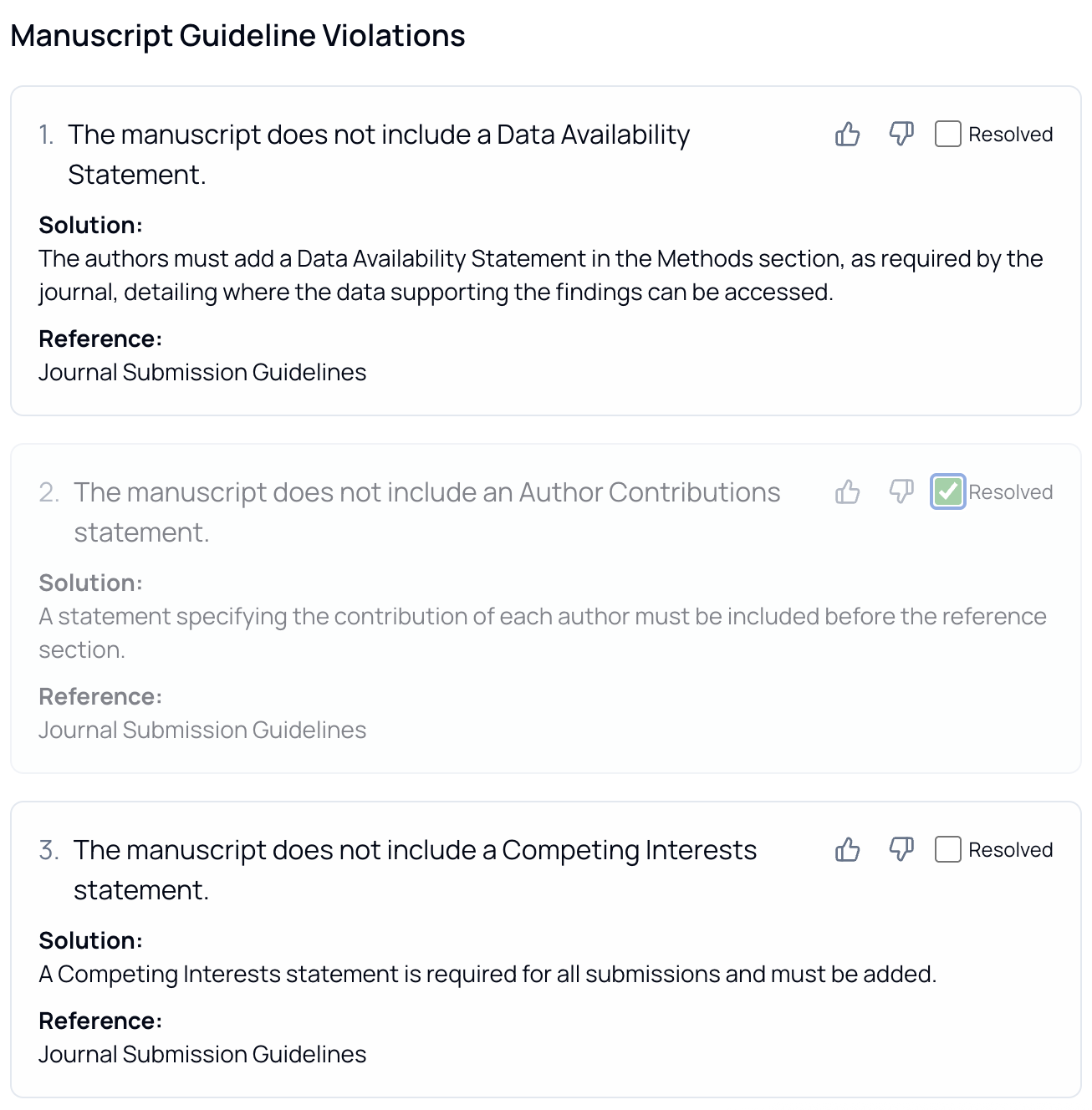 Journal Guideline Checks
Why Guideline Compliance?
Every journal has unique submission requirements, and missing them leads to preventable desk rejections:
- 30-40% of submissions are desk-rejected at many journals
- Each journal has different formatting, length, and content requirements
- Guidelines are often buried in lengthy author instruction pages
- Requirements vary by submission type (research article, review, letter, etc.)
Our system automatically finds and checks against your target journal's specific rules.
How It Works
1. Specify Your Target Journal
When you create a project, you specify the journal or conference you're targeting. This tells the system which guidelines to retrieve and check against.
2. Automatic Guideline Retrieval
The system:
- Searches for the official submission guidelines for your target venue
- Identifies the type of submission (research paper, review, etc.)
- Determines the submission stage (initial submission, resubmission, etc.)
- Extracts specific rules the manuscript must follow
3. Manuscript Analysis
Your manuscript is analyzed against each extracted rule:
- Each rule is checked for compliance
- Evidence is located within your manuscript
- A determination is made: met, not met, or unknown
- Specific reasons are provided for each assessment
4. Evidence Matching
For each rule, the system identifies:
- Where in your manuscript the rule is addressed (or should be)
- The specific text that satisfies (or fails) the requirement
- Page numbers and locations for easy reference
Types of Rules We Check
The system extracts and checks journal-specific rules including:
Document Requirements
| Rule Type | Examples |
|---|---|
| Length limits | Abstract word count, manuscript page limits |
| Format requirements | File format, font, margins, spacing |
| Structure | Required sections, heading formats |
| Language | Language requirements, style guidelines |
Content Requirements
| Rule Type | Examples |
|---|---|
| References | Minimum/maximum references, citation style |
| Figures | Resolution, format, color requirements |
| Tables | Formatting, placement guidelines |
| Supplementary materials | Requirements for additional files |
Submission-Specific Rules
| Rule Type | Examples |
|---|---|
| Cover letter | Required content or format |
| Title page | Author information requirements |
| Keywords | Number and format of keywords |
| Abstract structure | Required sections (Background, Methods, etc.) |
Understanding Results
Rule Status
Each rule shows one of three statuses:
| Status | Meaning |
|---|---|
| ✓ Met | Your manuscript satisfies this requirement |
| ✗ Not Met | Your manuscript doesn't meet this requirement |
| ? Unknown | Unable to determine compliance |
Rule Details
For each rule, you'll see:
- Rule name - What the requirement is about
- Description - Full explanation of what the journal requires
- Status - Whether your manuscript meets the rule
- Reason - Explanation of why the rule is or isn't met
- Evidence - Location in your manuscript where the rule is addressed
Visual Highlighting
When viewing your manuscript:
- Rules are linked to specific locations in your PDF
- Click on a rule to jump to the relevant section
- Highlighted regions show where requirements are addressed
- Navigate between findings using the sidebar
Managing Findings
Reviewing Results
For each guideline check:
- Review the rule and its requirements
- See the status and reasoning
- Click to view the evidence location in your manuscript
- Determine if changes are needed
Dismissing Findings
If a finding is incorrect or you've addressed it:
- Click to dismiss the finding
- The finding is removed from active results
- Dismissals can be restored at any time
Making Corrections
For rules that aren't met:
- Note the specific requirement
- Locate where to make changes in your manuscript
- Update your document accordingly
- Re-upload to verify compliance
Best Practices
Before Checking
- Know your target journal before starting
- Have a near-complete manuscript ready
- Ensure the PDF is text-searchable
Interpreting Results
- Focus on "Not Met" items - These need attention before submission
- Verify "Met" items - Double-check the evidence matches the rule
- Investigate "Unknown" - May require manual verification
- Cross-reference with journal site - Confirm current requirements
After Checking
- Address all "Not Met" requirements
- Re-check after making changes
- Keep a record of your compliance verification
- Submit with confidence
Supported Venues
The system can retrieve and check guidelines for:
- Major publishers (Elsevier, Springer Nature, Wiley, etc.)
- Society journals
- Open access journals
- Academic conferences
- Specialty and niche publications
For any venue with publicly available submission guidelines, the system can extract and verify requirements.
Limitations
What We Can't Check
- Requirements outside the document (e.g., suggested reviewers)
- Submission portal requirements
- Rules that require human judgment
- Very recently updated guidelines
Important Notes
- Guidelines are retrieved at the time of analysis
- Journals may update their requirements
- Always verify against the current author guidelines
- Some rules may require manual verification
Related Resources
- AI Review - Structured peer-review feedback
- Replicability Prediction - Assess reproducibility
- Journal Recommendations - Find the right venue