
API Integration Guide
This guide walks through how to integrate with the ReviewerZero screening API. It covers authentication, submitting manuscripts, receiving results via callback, and verifying callback signatures.
Overview
The integration flow has four steps:
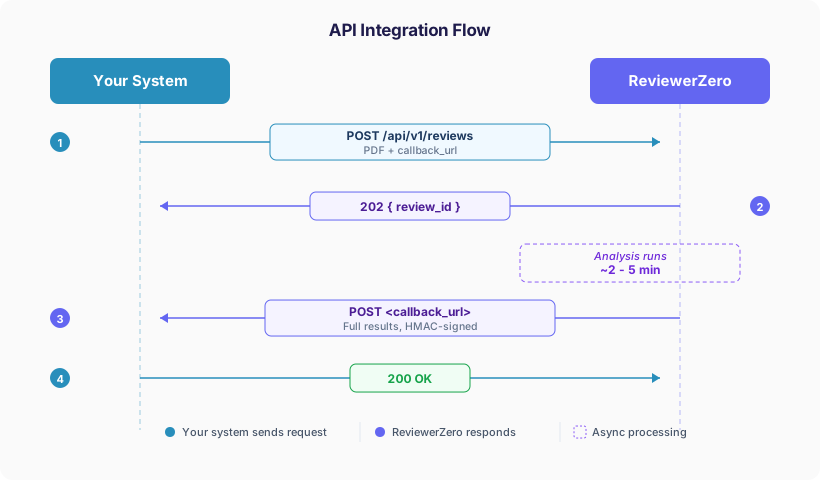 API Integration Flow
- One API call submits the manuscript and runs all screening tools (statistical validation, AI text detection, figure integrity, author verification, table duplication, reference analysis, AI peer review).
- One callback delivers the results when analysis finishes. By default it carries the red ("needs review") findings plus complete per-dimension issue counts; pass
payload_detail=fullto receive every analyzed item.
Authentication
Every request requires an Authorization header. The x-organization-id header is optional.
| Header | Value | Required | Description |
|---|---|---|---|
Authorization | Bearer rz_xxxxxxxxxxxx | Yes | Your API key |
x-organization-id | org_xxxxxxxx | No | Your organization ID |
When x-organization-id is provided, the submission is scoped to that organization and billed against the organization's plan. When omitted, the submission is associated with your personal account. You can find your organization ID in your Organization Settings.
Example (with organization):
Authorization: Bearer rz_abc123def456
x-organization-id: org_publisher_acme
Example (personal account):
Authorization: Bearer rz_abc123def456Submitting a Manuscript
Endpoint: POST https://www.reviewerzero.ai/api/v1/reviews
Content-Type: multipart/form-data
Input (one required)
Provide either file or url, but not both.
| Field | Type | Description |
|---|---|---|
file | File (PDF) | The manuscript PDF to analyze (multipart upload) |
url | string (URL) | URL pointing to a publicly accessible PDF (alternative to file upload) |
Optional Fields
| Field | Type | Default | Description |
|---|---|---|---|
callback_url | string (URL) | -- | URL where ReviewerZero will POST results when analysis completes |
payload_detail | string | issues_only | Detail level of the callback payload. issues_only delivers only red ("needs review") items plus complete per-dimension counts; full delivers every analyzed item |
run_integrity_report | boolean | true | Run research integrity analysis (figures, statistics, authors, references, etc.) |
run_peer_review | boolean | true | Run AI peer review (novelty, methodological issues, logical flaws) |
run_statistics_check | boolean | true | Statistical validation (p-values, effect sizes) |
run_ai_text_detection | boolean | true | AI-generated text detection |
run_plagiarism_detection | boolean | true | Plagiarism/text similarity detection |
run_figure_integrity | boolean | true | Figure duplication and manipulation detection |
run_figure_web_usage | boolean | true | Reverse image search for figures |
run_author_verification | boolean | false | Author identity verification via ORCID/OpenAlex |
run_table_duplication_check | boolean | true | Table duplication detection |
run_reference_analysis | boolean | true | Reference validation (DOI checks, retractions, PubPeer flags) |
All sub-flags require run_integrity_report=true to take effect. When omitted, sub-flags use their default values. You do not need to send every flag -- only include the ones you want to override.
Example Request -- File Upload (cURL)
curl -X POST https://www.reviewerzero.ai/api/v1/reviews \
  -H "Authorization: Bearer rz_abc123def456" \
  -H "x-organization-id: org_publisher_acme" \  # optional
  -F "file=@manuscript.pdf" \
  -F "callback_url=https://your-system.example.com/callbacks/reviewerzero" \
  -F "run_integrity_report=true" \
  -F "run_peer_review=true"
Example Request -- URL Submission (cURL)
curl -X POST https://www.reviewerzero.ai/api/v1/reviews \
  -H "Authorization: Bearer rz_abc123def456" \
  -F "url=https://arxiv.org/pdf/2301.00001" \
  -F "callback_url=https://your-system.example.com/callbacks/reviewerzero"
When using url, ReviewerZero downloads the PDF server-side. The URL must be publicly accessible, return a Content-Type of application/pdf, and the file must not exceed the maximum upload size.
Response
{
  "review_id": "proj_a1b2c3d4e5"
}
Store the review_id to correlate with the callback you will receive later.
Receiving Results via Callback
When the analysis completes (typically 2-5 minutes), ReviewerZero sends a POST request to the callback_url you provided.
Callback Request Headers
| Header | Description |
|---|---|
Content-Type | application/json |
X-ReviewerZero-Event | Event type: review.completed |
X-ReviewerZero-Signature | HMAC-SHA256 hex digest of the request body (see Verifying the Callback Signature) |
Callback Request Body
The JSON body contains the analysis results. By default (payload_detail=issues_only) the item arrays inside project.reports[].reportData and integrity.files[] contain only the red ("needs review") findings — retracted references, decision-flipping statistical errors, high-confidence AI text, failed author verification, AI-provenance or web-matched figures, high-priority peer-review issues — while integrity.issueSummary always reports the complete issue counts for every dimension (high, medium, totalAnalyzed). With payload_detail=full, every analyzed item is included. See Callback Payload Reference for the structure.
Your Callback Endpoint
Your endpoint should:
- Return
200 OK(or any 2xx status) to acknowledge receipt - Optionally verify the
X-ReviewerZero-Signatureheader (recommended)
If your endpoint returns a non-2xx status or is unreachable, ReviewerZero attempts delivery up to 3 times with exponential backoff (1s, 2s delays).
Verifying the Callback Signature
To verify that a callback genuinely came from ReviewerZero, compute the HMAC-SHA256 of the raw request body using your API key as the secret, and compare it to the X-ReviewerZero-Signature header.
Important: The signature is computed over a SHA-256 hash of your API key, not the raw API key itself. ReviewerZero does not store your raw API key.
Python Example
import hmac
import hashlib

def verify_signature(raw_body: bytes, signature_header: str, api_key: str) -> bool:
    """Verify the X-ReviewerZero-Signature header."""
    api_key_hash = hashlib.sha256(api_key.encode()).hexdigest()
    expected = hmac.new(
        api_key_hash.encode(),
        raw_body,
        hashlib.sha256
    ).hexdigest()
    return hmac.compare_digest(expected, signature_header)
Node.js Example
const crypto = require('crypto');

function verifySignature(rawBody, signatureHeader, apiKey) {
  const apiKeyHash = crypto.createHash('sha256').update(apiKey).digest('hex');
  const expected = crypto.createHmac('sha256', apiKeyHash)
    .update(rawBody)
    .digest('hex');
  return crypto.timingSafeEqual(
    Buffer.from(expected),
    Buffer.from(signatureHeader)
  );
}
Callback Payload Reference
The example below shows the default payload_detail=issues_only shape. With payload_detail=full, the structure is identical but the item arrays (reports[].reportData.validation_results, integrity.files[].statchecks, authors, figures, and so on) contain every analyzed item instead of only the red ones.
{
  "event": "review.completed",
  "review_id": "proj_a1b2c3d4e5",
  "payload_detail": "issues_only",
  "project": {
    "id": "proj_a1b2c3d4e5",
    "name": "manuscript.pdf",
    "description": null,
    "status": "finished",
    "createdAt": "2026-03-15T10:30:00.000Z",
    "updatedAt": "2026-03-15T10:35:00.000Z",
    "targetJournalOrConference": null,
    "generatePeerReviewReport": true,
    "generateResearchIntegrityReport": true,
    "generateJournalRecommendation": false,
    "reports": [
      {
        "id": "rpt_xyz",
        "reportType": "review",
        "reportData": { "...": "AI peer review results (red items only in issues_only mode)" },
        "createdAt": "2026-03-15T10:34:00.000Z"
      },
      {
        "id": "rpt_abc",
        "reportType": "references",
        "reportData": { "...": "reference validation results (red items only in issues_only mode)" },
        "createdAt": "2026-03-15T10:34:30.000Z"
      }
    ],
    "user": { "id": "usr_...", "name": "...", "image": null },
    "organization": { "id": "org_publisher_acme", "name": "Acme Publishing", "slug": "acme", "logo": null }
  },
  "integrity": {
    "projectId": "proj_a1b2c3d4e5",
    "files": [
      {
        "id": "pf_...",
        "fileType": "application/pdf",
        "pages": [{ "pageNumber": 1, "publicUrl": "..." }]
      }
    ],
    "issueSummary": {
      "highTotal": 2,
      "mediumTotal": 5,
      "total": 7,
      "dimensions": [
        {
          "dimension": "statistics",
          "label": "Statistical Checks",
          "issueCount": 1,
          "high": 1,
          "medium": 0,
          "totalAnalyzed": 15,
          "totalAnalyzedDisplay": "15 statistics"
        },
        {
          "dimension": "figures",
          "label": "Figure Integrity",
          "issueCount": 1,
          "high": 1,
          "medium": 0,
          "totalAnalyzed": 8,
          "totalAnalyzedDisplay": "8 figures"
        }
      ]
    }
  },
  "report_url": "https://www.reviewerzero.ai/app/review/proj_a1b2c3d4e5",
  "dismissed_items": [
    { "itemType": "peer-review", "itemId": "review-issue-2" }
  ],
  "timestamp": "2026-03-15T10:35:01.000Z"
}
Key Fields
| Field | Description |
|---|---|
event | Always review.completed |
review_id | The ID returned when you submitted the manuscript |
payload_detail | issues_only (red items only, default) or full (every analyzed item) |
project.status | finished when analysis is complete |
project.reports | Array of report objects. reportType can be review (AI peer review), references, replicability-assessment, submission-guidelines, table-duplication. In issues_only mode, report types without a defined red-signal (e.g. internal/in-development analyses) are omitted; they appear in payload_detail=full |
integrity.issueSummary | Aggregated issue counts by dimension and severity (high, medium). Always computed over ALL analyzed items, regardless of payload_detail, and EXCLUDING editor-dismissed items |
integrity.issueSummary.dimensions | Per-dimension breakdown: statistics, figures, panels, ai-text, plagiarism, authors, tables, references, peer-review, replicability, guidelines |
dismissed_items | Items an editor dismissed in the ReviewerZero app, each { itemType, itemId }. In payload_detail=full the report arrays still include these items; use this list to reconcile them with issueSummary (whose counts exclude them) |
report_url | Direct link to the full interactive report on ReviewerZero |
timestamp | ISO 8601 timestamp of when the callback was sent |
What counts as "red" (needs review)?
The issues_only payload keeps exactly the items the ReviewerZero report marks red:
| Dimension | Red condition |
|---|---|
references | Cited paper is retracted |
statistics | Statistical error that flips the significance conclusion, or a logically impossible result |
ai-text | Paragraph flagged as likely AI-generated with high confidence |
plagiarism | Paragraph with ≥50% matched text |
authors | Author verification failed or could not be completed |
figures | C2PA provenance shows AI generation, or a full/partial reverse-image-search match |
tables | High-severity cross-table duplication |
peer-review | High-priority issue raised by the AI peer review |
replicability | Checklist item with a critically low rating (except pre-registration items, which cap at amber) |
guidelines | Submission guideline rule not met |
In addition, integrity.files[].citationWorthiness (sentences flagged for problematic citation usage — a claim that needs a citation, or a citation where none is expected) is filtered to flagged items; these are counted in integrity.issueSummary.citations but are not part of the dimensions matrix.
Amber ("worth verifying") and green ("verified") items are excluded from the arrays; amber items are still counted in integrity.issueSummary (medium), and green items are reflected in totalAnalyzed.
Items an editor dismissed in the ReviewerZero app are excluded from the issues_only arrays and from every integrity.issueSummary count. In payload_detail=full they still appear in the report arrays (so "full" is a complete record), but each is listed in the top-level dismissed_items array so you can filter them out and reconcile against the counts.
Polling (Alternative)
If you prefer polling over callbacks (or need to re-fetch results), you can use:
Endpoint: GET https://www.reviewerzero.ai/api/v1/reviews/{review_id}
curl https://www.reviewerzero.ai/api/v1/reviews/proj_a1b2c3d4e5 \
  -H "Authorization: Bearer rz_abc123def456"
The response defaults to payload_detail=issues_only (red items only). To fetch every analyzed item:
curl "https://www.reviewerzero.ai/api/v1/reviews/proj_a1b2c3d4e5?payload_detail=full" \
  -H "Authorization: Bearer rz_abc123def456"
Check project.status:
open-- not yet startedprocessing-- analysis in progressfinished-- results are ready
Review Quality Evaluation
Evaluate the quality of a peer-review report (rather than a manuscript). This is a synchronous endpoint — the evaluation is returned in the response, no callback needed.
Endpoint: POST https://www.reviewerzero.ai/api/v1/reviews/evaluate
curl -X POST https://www.reviewerzero.ai/api/v1/reviews/evaluate \
  -H "Authorization: Bearer rz_abc123def456" \
  -H "Content-Type: application/json" \
  -d '{
    "review_text": "The manuscript addresses an important question...",
    "include_ai_detection": true,
    "include_review_mill_detection": true
  }'
Request fields:
| Field | Type | Default | Description |
|---|---|---|---|
review_text | string | required | The full text of the peer review to evaluate |
include_ai_detection | boolean | false | Also classify the review as human/AI-written with a probability score |
include_review_mill_detection | boolean | false | Also compare the review against documented review-mill patterns |
Response highlights:
results— sentence-level scores across eight review aspects (materials & methods, results & discussion, suggestions & solutions, criticism, importance & relevance, presentation & reporting, examples, praise)averages— per-aspect average scores across the reviewquality_assessment—is_low_qualityverdict withmissing_importantaspects and per-aspect detail (average score, dedicated-sentence count, and which threshold failed)ai_detection— present when requested; AI-probability classification of the review textreview_mill_detection— present when requested; matched windows with similarity scores and the documented source of each match
Evaluations are billed per call; a 402 response means the account has insufficient credits.
Service Status
Check API availability, or point your uptime monitoring at it. No authentication required.
Endpoint: GET https://www.reviewerzero.ai/api/v1/status
curl https://www.reviewerzero.ai/api/v1/statusResponse codes:
| Code | Meaning |
|---|---|
200 | All components operational |
503 | One or more components degraded |
Healthy response (200):
{
  "status": "operational",
  "components": {
    "api": { "status": "operational", "latency_ms": 0 },
    "database": { "status": "operational", "latency_ms": 13 },
    "review_service": { "status": "operational", "latency_ms": 446 }
  },
  "checked_at": "2026-07-08T22:12:02.914Z"
}
Degraded response (503): the same structure is nested under data, with the affected component marked degraded and a short error reason ("timeout" or "unavailable"):
{
  "defined": false,
  "code": "SERVICE_UNAVAILABLE",
  "status": 503,
  "message": "One or more components are degraded.",
  "data": {
    "status": "degraded",
    "components": {
      "api": { "status": "operational", "latency_ms": 0 },
      "database": { "status": "operational", "latency_ms": 17 },
      "review_service": {
        "status": "degraded",
        "latency_ms": 30006,
        "error": "timeout"
      }
    },
    "checked_at": "2026-07-08T22:11:18.276Z"
  }
}
To monitor availability, poll the endpoint and alert on any non-200 response. HEAD requests receive the same status code with an empty body. Results are cached for 60 seconds, so there is no benefit to polling more frequently than that.
Interactive API Documentation
Full interactive API documentation with request/response schemas is available at:
https://www.reviewerzero.ai/docs/api
You can try out endpoints directly from the browser using your API key.
Questions? Contact us at support@reviewerzero.ai.