
API v1 Overview
This guide walks through how to integrate with the ReviewerZero screening API. It covers authentication, submitting manuscripts, receiving results via callback, and verifying callback signatures.
How It Works
The integration flow has four steps:
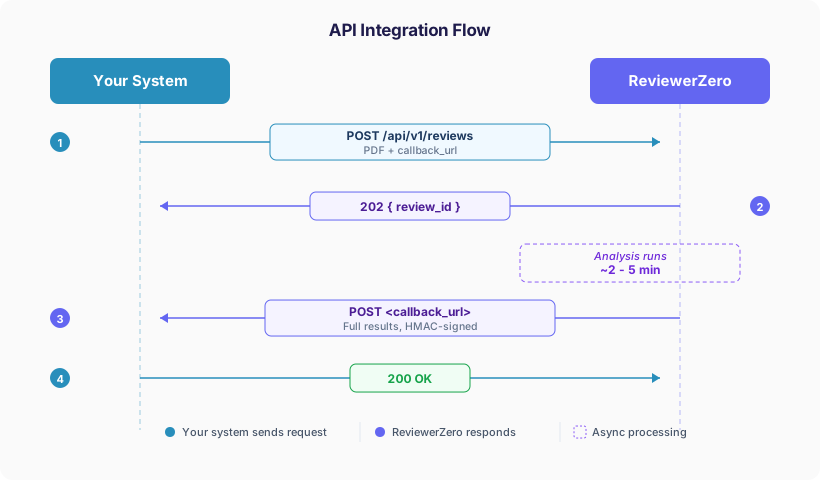 API Integration Flow
- One API call submits the manuscript and runs all screening tools (statistical validation, AI text detection, figure integrity, author verification, table duplication, reference analysis, AI peer review).
- One callback delivers the results when analysis finishes. By default it carries the red ("needs review") findings plus complete per-dimension issue counts; pass
payload_detail=fullto receive every analyzed item.
Authentication
Every request requires an Authorization header. The x-organization-id header is optional.
| Header | Value | Required | Description |
|---|---|---|---|
Authorization | Bearer rz_xxxxxxxxxxxx | Yes | Your API key |
x-organization-id | org_xxxxxxxx | No | Your organization ID |
When x-organization-id is provided, the submission is scoped to that organization and billed against the organization's plan. When omitted, the submission is associated with your personal account. You can find your organization ID in your Organization Settings.
Example (with organization):
Authorization: Bearer rz_abc123def456
x-organization-id: org_publisher_acme
Example (personal account):
Authorization: Bearer rz_abc123def456In This Guide
| Page | Covers |
|---|---|
| Submitting a Manuscript | POST /api/v1/reviews: the input, the analysis flags, your own guidelines |
| Results and Callbacks | The review.completed callback, polling with GET /api/v1/reviews/{review_id}, and the payload reference |
| Verifying Callback Signatures | Checking that a callback came from ReviewerZero, with Python and Node.js examples |
| Review Quality Evaluation | POST /api/v1/reviews/evaluate for a peer-review report |
| Finding Reviewers | /api/v1/reviewer-searches: suggested reviewers with contact emails |
| Service Status | GET /api/v1/status for uptime monitoring |
Interactive API Documentation
Full interactive API documentation with request/response schemas is available at www.reviewerzero.ai/docs/api. You can try out endpoints directly from the browser using your API key.
API v2 (Beta)
API v2 (beta) returns a review the way ReviewerZero's Feedback view presents it to an editor: one fixed shape per dimension. It changes the review result and its callback; every other endpoint is served under /api/v1 as described here.
Questions? Contact us at support@reviewerzero.ai.